Text alerts
Text message alerts
Last updated September 24, 2026.
YourCardSentry text alerts warn you by text when your household’s spending is getting close to the limit you set. They are optional, they are off until you turn them on, and they are only ever about your budget — we never send marketing texts.
How you opt in
- Sign in to the app and open Alerts.
- Under Where alerts go, tap Add a mobile number.
- Enter a US mobile number. The disclosure below is printed directly under the number field, next to the button that sends the code.
- Tap Text me a code. That tap is the opt-in: no box is ticked for you, and nothing is texted until you press it.
- Enter the six-digit code we text you to confirm the number, then tap Save alert settings. The same disclosure is shown again beside the SMS setting whenever it can be switched on.
What you read when you opt in
This is the text shown at the point of opt-in in the app, word for word:
By providing your mobile number, you agree to receive automated text messages from YourCardSentry: one-time verification codes and the budget alerts you turn on. Message frequency varies. Msg & data rates may apply. Reply HELP for help or STOP to cancel. Consent is not a condition of purchase. See our Terms and Privacy Policy.
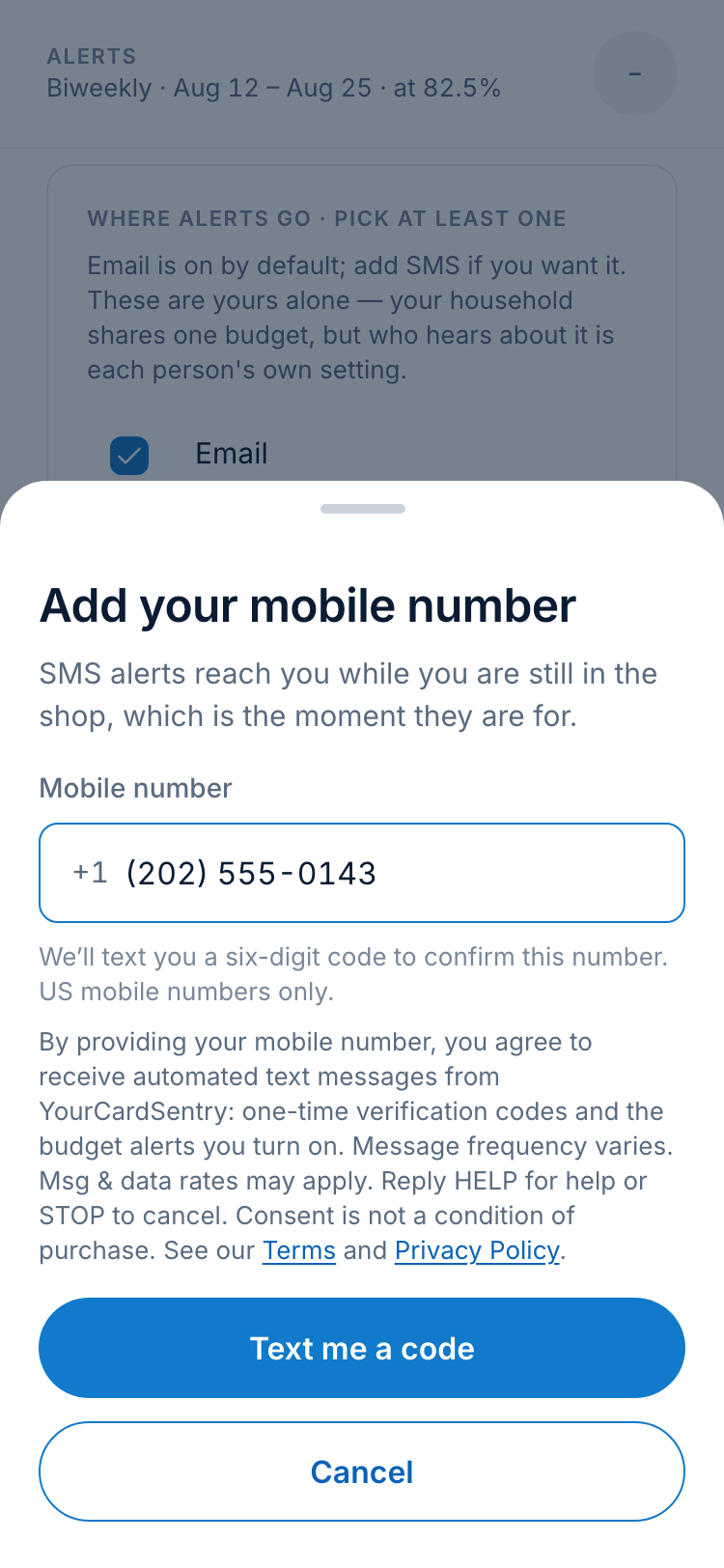
The messages we send
Three kinds of message, and nothing else — the threshold alert has two wordings, so there are four examples below. Each is the real template with sample figures.
Verification code
Once, each time you ask the app to confirm a mobile number.
YourCardSentry code: 482913. Expires in 10 min. Reply STOP to opt out. @app.yourcardsentry.com #482913
Budget threshold alert
When your household’s spending crosses a threshold you set (80%, 90% and 100% by default) — at most once per threshold per budget period.
YourCardSentry: 80% of your $1,000.00 budget used. $200.00 left, 9 days to reset.
Threshold alert, over budget
The same alert, worded for a household that has already gone past its limit.
YourCardSentry: you're $150.00 over your $1,000.00 budget. 9 days to reset.
Over-budget reminder
Only if you turn it on: at most one a day while you stay over budget, until the period resets.
YourCardSentry: you're $150.00 over your $1,000.00 budget with 9 days to go.
How often, and what it costs
Message frequency varies with your spending and your settings: at most one text for each threshold you set in each budget period, at most one reminder a day while you are over budget if you turned reminders on, and a code whenever you ask for one.
Msg & data rates may apply. Text alerts are available on US mobile numbers only. Carriers are not liable for delayed or undelivered messages.
Stopping texts, and getting help
Reply STOP to any message to stop all texts. You will get one message confirming it, and nothing after that. You can also untick SMS in your alert settings in the app and save.
Reply HELP to any message for help, or email support@yourcardsentry.com.
The full program terms are in our Terms of Service, and how we handle your number is in our Privacy Policy. Mobile numbers and SMS opt-in consent are never shared with third parties or affiliates for marketing or promotional purposes.